Navigating the API Reference
Overview
The Terminal API Reference defines the message structure and endpoints used to communicate with Worldline payment terminals following the Nexo Retailer v5.1 standard.
This section helps developers understand how to interpret, explore, and implement the API efficiently — from sending their first SaleToPOIServiceRequest to managing terminal status or reconciliation flows.
If you’re already familiar with the Guides , this page will help you move confidently between conceptual examples and the detailed reference.
Structure and Navigation
The reference is organised around functional areas :
Payments – Standard and asynchronous payment requests, pre-authorisations, and refunds
Admin – Administrative or configuration-related actions
Deprecated – Legacy endpoints retained for backward compatibility
Use the sidebar to explore endpoints by tag or search directly by keyword (e.g., Reconciliation, Abort, DeviceRequest).
Each endpoint page in the API viewer follows the same structure, providing consistent and scannable information.
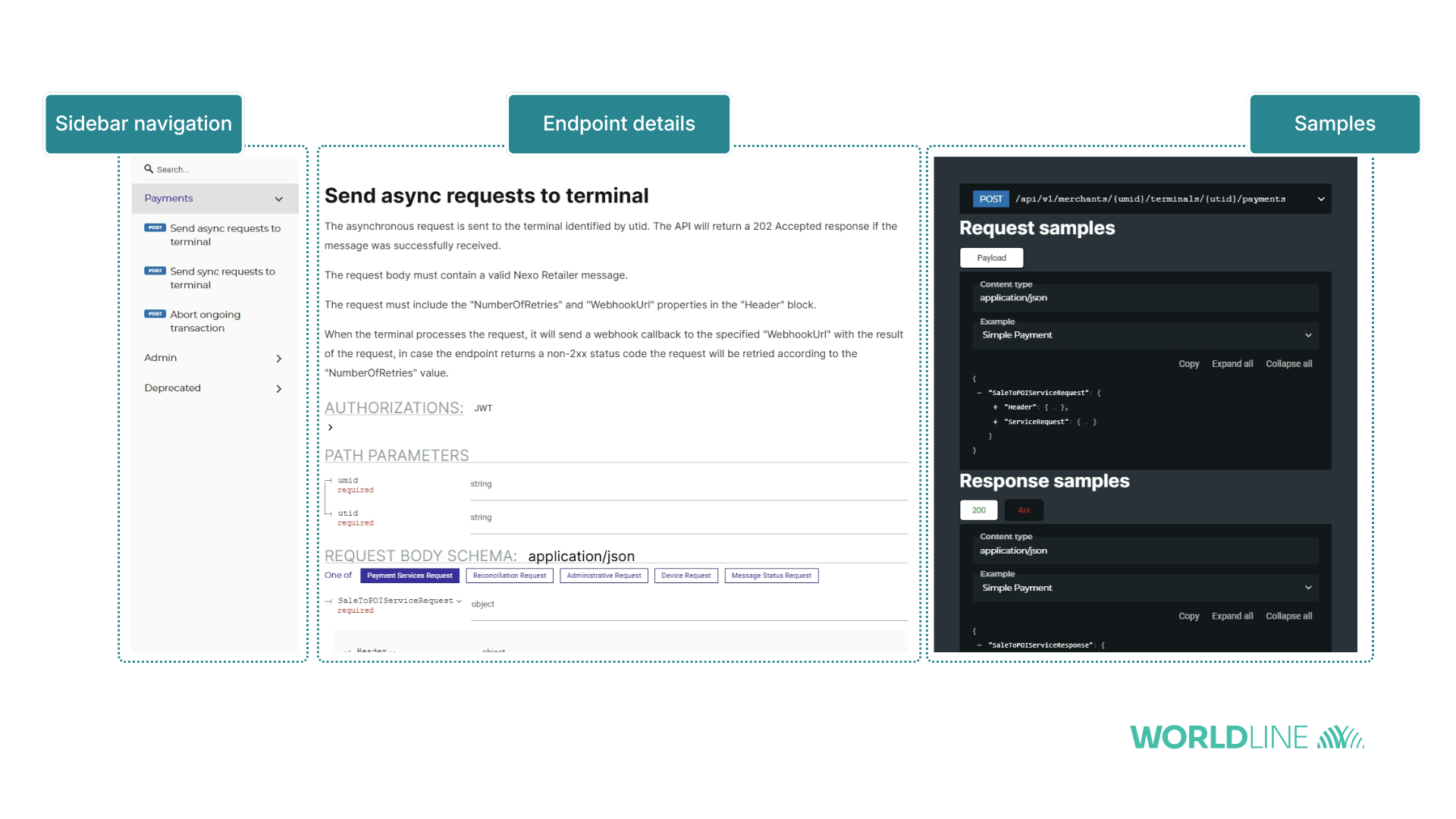
Reading Endpoint Details
Each endpoint entry includes:
- HTTP Method & Path – For example:
POST /api/v1/merchants/{umid}/terminals/{utid}/payments
- Summary & Description – Clarifying when and why to use the endpoint
- Parameters –
umidandutididentify the merchant and terminal
- Security – All calls require a JWT bearer token
- Request Body – Must contain a valid Nexo message, such as
SaleToPOIServiceRequestorSaleToPOIReconciliationRequest
- Response – Structured according to Nexo response messages (e.g.,
SaleToPOIServiceResponse,SaleToPOIMessageRejection)
- Examples – Real payloads demonstrating request/response behaviour
Because Nexo messages encapsulate both the Header and Body, pay close attention to required fields such as MessageHeader, MessageType and transaction-specific blocks.
Some headers, like NumberOfRetries or WebhookUrl, are only applicable for asynchronous calls.
Schemas and Objects
The Schemas section defines every object used by the API — from Card and POI data structures to complex nested types like SaleToPOIAdministrativeRequest.
Each schema includes:
- Type and format (e.g.,
string,int32)
- Required fields
- Field descriptions or enumerations (for instance,
MerchantReceiptorCardholderReceiptdestinations)
- References to related request/response objects
Understanding these data models is key to creating valid Nexo-compliant payloads.
Searching and Filtering
You can quickly locate any element via the search bar in the API interface.
Use keywords such as:
- Endpoint names (
/payments,/abort)
- Object names (
SaleToPOIServiceRequest)
- Schema components (
Card,POI,Capabilities)
Search results display both endpoints and object definitions, allowing you to trace a property from schema to endpoint.
Versioning and Deprecation
This documentation covers Terminal API version 5.1-WL1.0.0 , aligned with Nexo Retailer 5.1 .
Endpoints marked under the Deprecated tag remain accessible but should not be used in new implementations.
Always review the Release notes for updates or migration notes when a new release becomes available.
Implementation Tips
Start with the guides to understand the transaction lifecycle before exploring the reference.
Validate your payloads against the schema definitions to ensure Nexo compliance.
Test in Integration using the base URL https://api.terminal.iacc.global.worldline-solutions.com before switching to Production.
Handle 4xx responses gracefully — these usually indicate message delivery or schema validation issues. More on the FAQ & Troubleshooting page .
Monitor timeouts and retries for asynchronous endpoints.
Explore live schemas and examples with the API Reference viewer .
Follow version updates and new releases on the Release Notes page