Sending your first request
Introduction
This page guides you through sending your first simple request to the Worldline Terminal API. We'll demonstrate a synchronous payment request - the most common operation you'll perform. While this guide uses synchronous requests for their simplicity and ease of understanding, please note that asynchronous requests are the preferred approach for production environments due to their better performance and reliability characteristics.
For this example, we'll use the integration environment, allowing you to test your implementation before moving to production. The API base URL for the integration environment is:
https://api.terminal.iacc.global.worldline-solutions.com
Prerequisites
To get your terminal ready for API integration:
Physical Setup: Ensure your terminal is powered on and connected to the internet via Ethernet or Wi-Fi.
Terminal Registration: Your terminal must be registered with Worldline and assigned a unique terminal ID.
Configuration: The terminal should be configured with the correct integration environment settings.
Network Access: Verify that your terminal can reach the API endpoints and has proper firewall permissions.
For detailed terminal setup instructions, including configuration steps and troubleshooting, see our Terminal Setup Guide .
Before making your first API request, ensure you have:
Terminal ID: The unique identifier assigned to your registered terminal.
API Credentials: Your integration environment API key and authentication details.
Network Configuration: Confirmed connectivity between your terminal and the API endpoints.
Once your terminal is properly set up and you have gathered the required information, you can proceed with the API integration steps outlined below.
The payment request endpoint
To process a payment, you'll send a POST request to:
/api/v1/merchants/{MERCHANT_ID}/terminals/{TERMINAL_ID}/payments/sync
Path parameters:
{MERCHANT_ID}– Your merchant identifier.{TERMINAL_ID}– The terminal identifier processing the transaction.
Request headers
Your request must include these HTTP headers:
Header |
Value |
|---|---|
Content-Type |
application/json |
Authorization |
Bearer {YOUR_TOKEN} |
Request body structure
The request body contains a SaleToPOIServiceRequest object with two main components:
Header object – Contains message metadata:
Identifies the message type and version.
Provides unique identifiers for request tracking.
Specifies the initiating party.
ServiceRequest object – Contains transaction details:
Defines the payment amount and currency.
Includes transaction references.
Specifies the transaction type.
Field |
Description |
Example Value |
|---|---|---|
MessageFunction |
Type of request being made. |
"SaleFinancialServiceRequest" |
ProtocolVersion |
API protocol version. |
"5.1-WL1.0.0" |
Currency |
ISO 4217 currency code. |
"EUR" |
TotalAmount |
Transaction amount. |
100 |
curl --location 'https://api.terminal.iacc.global.worldline-solutions.com/api/v1/merchants/YOUR_MERCHANT_ID/terminals/YOUR_TERMINAL_ID/payments/sync' \\
--header 'Content-Type: application/json' \\
--header 'Authorization: Bearer YOUR_TOKEN' \\
--data '{
  "SaleToPOIServiceRequest": {
    "Header": {
      "MessageFunction": "SaleFinancialServiceRequest",
      "ProtocolVersion": "5.1-WL1.0.0",
      "ExchangeIdentification": "642",
      "CreationDateTime": "2024-11-15T10:30:00.0+01:00",
      "InitiatingParty": {
        "Identification": "YOUR_MERCHANT_ID",
        "Type": "Merchant"
      }
    },
    "ServiceRequest": {
      "ServiceContent": "FinancialPaymentRequest",
      "PaymentRequest": {
        "PaymentTransaction": {
          "TransactionType": "CardPayment",
          "TransactionIdentification": {
            "TransactionDateTime": "2024-11-15T10:30:00.0+01:00",
            "TransactionReference": "R26197055"
          },
          "TransactionDetails": {
            "Currency": "EUR",
            "TotalAmount": 100
          }
        }
      }
    }
  }'
What happens next
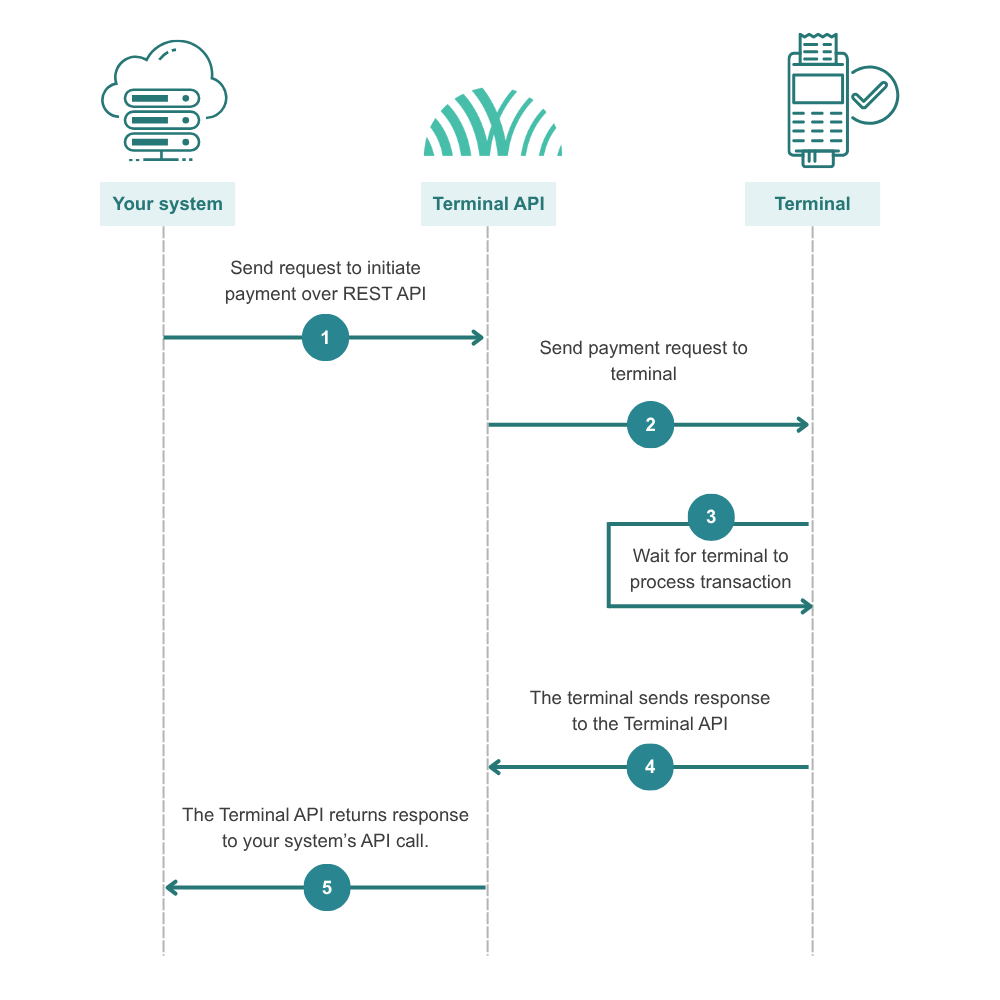
Once your request is received, the Terminal API will:
Send a request to the terminal over WebSocket to initiate the payment.
Wait for the terminal to process the transaction.
Return the response to your API call.
You'll receive an HTTP response with one of these status codes:
HTTP 2XX – Request successfully received and sent to terminal for processing.
HTTP 400 – Invalid request format or parameters.
HTTP 401 – Authentication failed.
HTTP 404 – Not Found (In case of an unknown MERCHANT_ID or TERMINAL_ID, as well if the terminal is not connected).
HTTP 500 – Server error.
The response body will contain transaction results and status information.